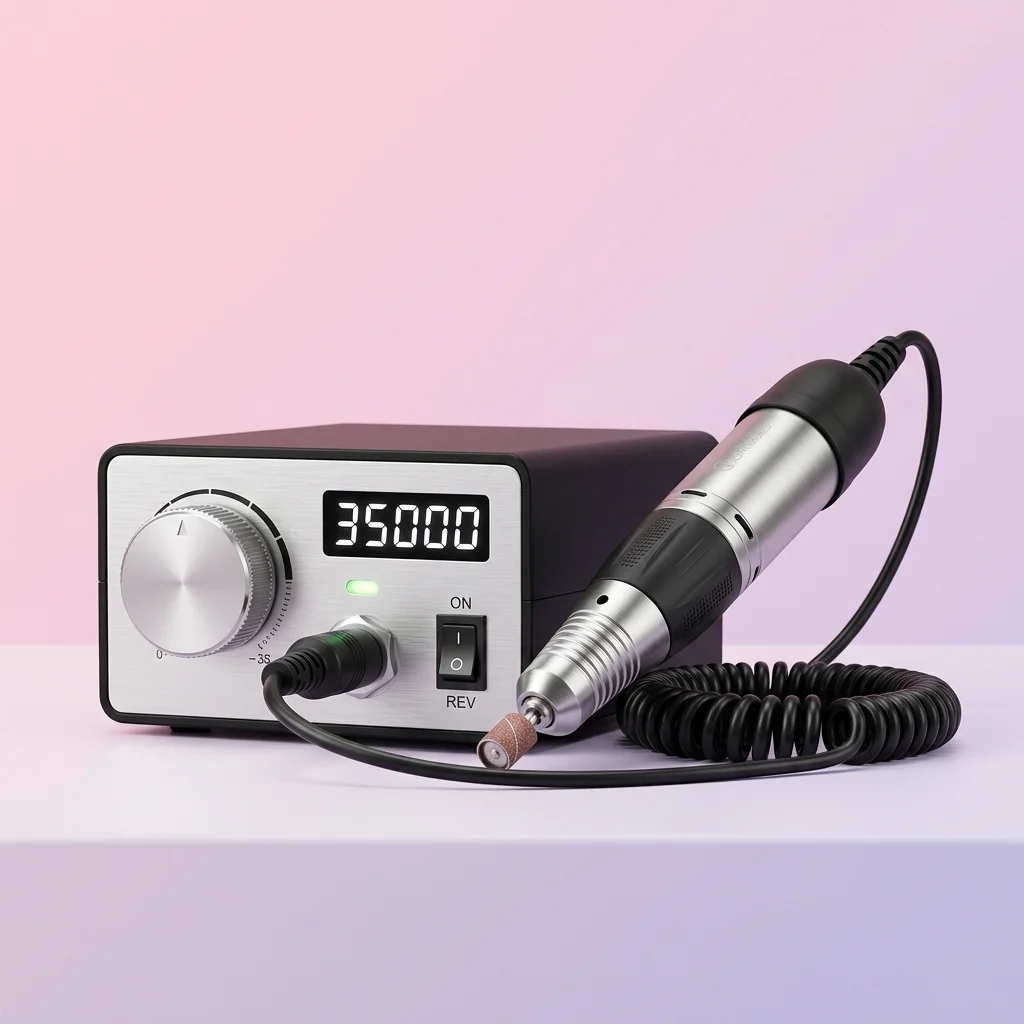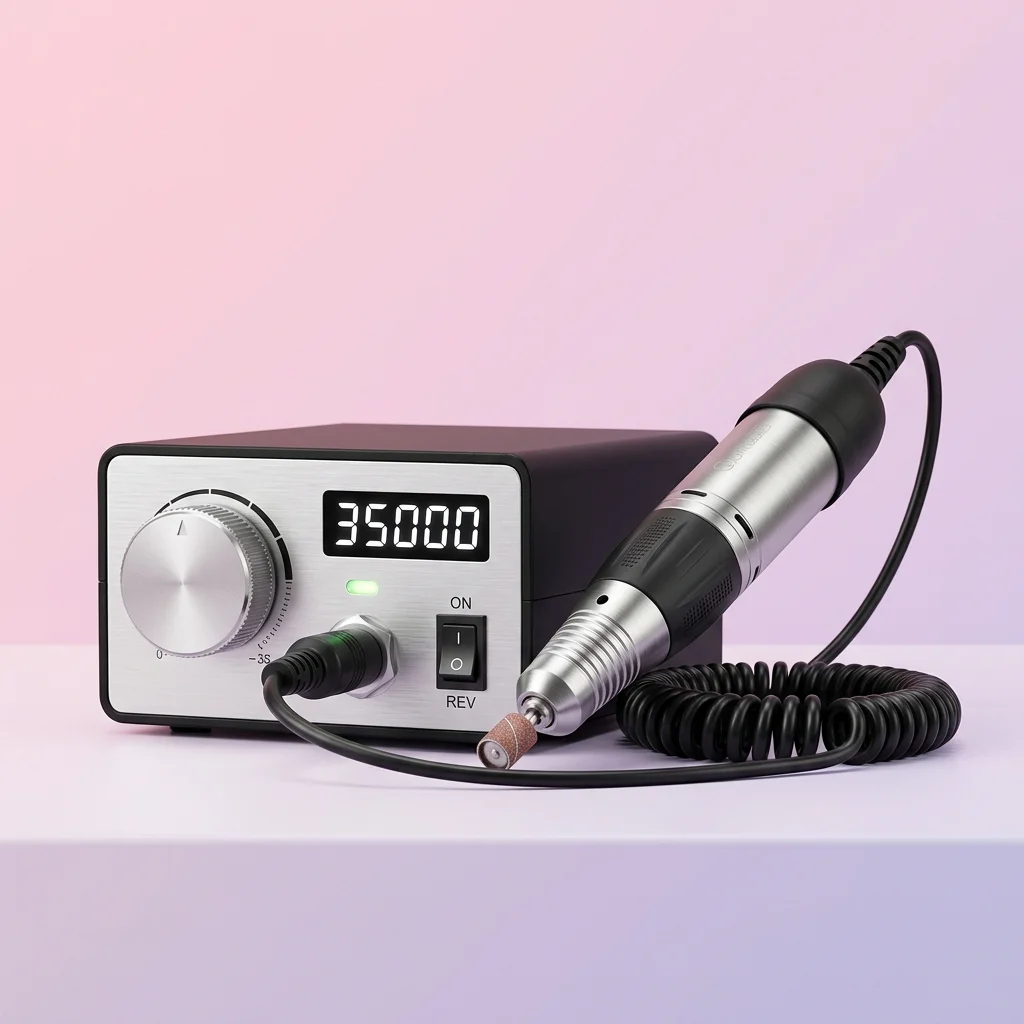
I've been running the Makartt JD700 Professional E-File Nail Drill through its paces for about seven weeks now — using it on clients ranging from a quick gel fill to a full set of acrylics with heavy sculpting. Before this, I was using a Kupa e-file that cost me roughly three times the price, so I went in skeptical. In this makartt nail drill pro review, I'm breaking down everything: what impressed me, what didn't, and whether this thing actually belongs behind a professional desk or if it's better suited for home hobbyists.
E-files have become borderline non-negotiable for anyone doing nails more than once a week. I used to hand-file every set — and yeah, I still keep my trusty files close — but the amount of time and repetitive strain I was putting on my wrists just wasn't sustainable. A solid drill cuts prep time in half, makes cuticle work smoother, and honestly just lets you produce cleaner work. The problem is the price gap between "cheap junk that vibrates your hand numb" and "professional grade that won't die on you" used to be massive. Lately, though, brands like Makartt have been closing that gap, and the JD700 is their pitch at the pro market. So let's get into it.
Verdict: A surprisingly capable workhorse for the price, but it's not flawless
The Makartt JD700 punches above its price bracket in terms of raw power and build quality. The all-metal handpiece feels genuinely professional, and the 35,000 RPM ceiling handles acrylic removal and hard gel shaping without flinching. Where it stumbles is in vibration control at top speeds and the foot pedal being a separate, optional purchase. For a solo tech on a budget or someone transitioning from a starter drill, it's a strong pick. For high-volume salons running multiple stations, you'll probably want to stick with higher-end brands.
How it scored:
Here's the quick breakdown across the categories I care about most:
- Power & Performance: 8.5/10 — Plenty of torque. Handled everything I threw at it from dip powder removal to shortening acrylics.
- Build Quality: 8.0/10 — The handpiece is solid. The control unit is decent but not premium-feeling.
- Vibration & Noise: 6.5/10 — This is where you notice the price difference. Gets buzzy above 25,000 RPM.
- Usability & Controls: 8.0/10 — Variable dial is smooth. Forward/reverse toggle is handy. Foot pedal support is there, if you buy the pedal.
- Value for Money: 9.0/10 — Hard to argue with what you get at this price point.
Specs
| Specification | Detail |
|---|---|
| Max Speed | 35,000 RPM |
| Rotation | Forward & Reverse |
| Handpiece Material | All-Metal |
| Speed Control | Variable Dial |
| Foot Pedal | Supported (sold separately) |
| Best For | Acrylic & Hard Gel |
| Handpiece Type | Twist-lock chuck |
| Cooling | Ventilation slots on control unit |
Design & Build Quality
Let's start with the handpiece because that's what you're actually holding all day. The JD700's handpiece is all metal, and you notice it the second you pick it up. It's got some heft — not so much that it'll fatigue you during a long set, but enough that it doesn't feel like a toy. I've used drills in this price range where the handpiece is plastic with a metal sleeve, and you can tell. This one feels like the real deal. The twist-lock chuck grips bits securely, and I didn't have any issues with bits slipping or wobbling during seven weeks of regular use. That's a big deal, because a loose bit is a dangerous bit.
The control unit is where you start to see the budget. It's functional, well-labeled, and doesn't take up a ton of desk space, but the plastic housing feels a bit lightweight compared to what I'm used to. The variable speed dial has a decent range of motion — not too loose, not too stiff — and the on/off toggle for forward and reverse is right where you'd expect it. Nothing groundbreaking in the layout, but nothing frustrating either. The ventilation does its job, and I never noticed the unit getting hot even during back-to-back sessions, which was a pleasant surprise.
The cord connecting the handpiece to the control unit is a decent length — I measured mine at roughly four feet. Enough to move around a client comfortably, but if you're someone who likes a lot of freedom, you might find yourself wishing for another foot or two. The base has rubber feet, which keeps it from sliding around on a glass desk. Small detail, but I appreciate it.
Performance & Real-World Testing
This is the meat of any makartt nail drill pro review, right? Power is what matters. I ran this drill through my typical workload for seven weeks: acrylic prep, hard gel shaping, gel polish removal, backfill cut-backs, and some detailed cuticle work around the eponychium.
Acrylic removal: At 30,000–35,000 RPM with a coarse carbide bit, the JD700 chewed through acrylic product like it was nothing. I didn't feel the motor straining or bogging down, even when I pressed in a bit to get through thicker areas near the stress zone. This is the area where I'd say it genuinely competes with drills at two or three times its price. The torque is there.
Hard gel shaping: Same story — strong performance. I used a medium ceramic barrel bit at around 20,000 RPM for surface shaping, and it was smooth and controllable. The variable dial gave me enough precision to dial down to 12,000 RPM for refining the free edge without losing power. That low-end control matters a lot for detail work, and the JD700 handles it well.
Gel polish removal: Here's where I'd typically use a lower grit sanding band at about 15,000 RPM, and the drill performed fine. Nothing to complain about. It's not the most demanding task, so this was expected.
Cuticle area prep: This is where my opinion gets mixed. At lower speeds (8,000–15,000 RPM), the handpiece is reasonably smooth. But when I needed to jump up to 20,000+ for cleaning sidewalls with a small flame bit, the vibration became noticeable. Not dangerous, not awful, but noticeably more than what I get from my Kupa or even a Medicool. Over a single client? No big deal. Over a full day of eight-plus clients? Your hand's gonna feel it. That vibration translates to fatigue, and fatigue leads to sloppy work or, worse, injury.
Forward and reverse: I used reverse mostly for working on the left hand (I'm a righty) and for certain shaping angles. The transition is quick — flip the switch and the bit changes direction almost instantly. No lag, no weird stutter. This is one of those features that sounds minor but actually makes your workflow smoother.
I also tested it with the optional foot pedal. I had to source that separately, which is a minor annoyance. Once connected, it worked as expected — hands-free speed control is nice when you're doing something intricate and don't want to take your eyes off the nail. But the pedal itself feels cheap. It's lightweight plastic, and I could see it sliding around on a tile floor. I ended up putting a non-slip mat under it.
Comfort & Usability
Comfort during a full day of clients is probably the most underrated factor when people are shopping for an e-file. The JD700's handpiece weighs around 6.5 ounces based on my kitchen scale, which is a bit heavier than the lightweight handpieces you get from brands like Saeshin. That extra weight comes from the all-metal construction, and it's a tradeoff — you get durability, but your hand is doing more work. For a three-hour block of acrylic fills, I was fine. For a full Saturday doing ten clients, I switched back to my lighter handpiece halfway through.
The variable dial is easy to adjust with one hand, even mid-service. I've used drills where the speed knob is either too stiff or too sensitive — you breathe on it and the RPM jumps. The JD700's dial has a nice resistance to it. You can make small adjustments without overshooting. That said, there's no digital display showing your exact RPM. You're going by feel and the analog dial markings, which aren't the most precise. If you're a tech who likes to work at exact speeds for specific bits and techniques, that might bug you. I mostly go by feel anyway, so it wasn't a dealbreaker.
The twist-lock bit change is straightforward. I can swap bits one-handed in about five seconds. No complaints there. Some cheaper drills use collet systems that require a wrench, and that slows you way down between steps. Makartt got this right.
How It Compares
| Feature | Makartt JD700 | Kupa ManiPro Passport | Medicool Pro Power 230 |
|---|---|---|---|
| Max RPM | 35,000 | 30,000 | 30,000 |
| Handpiece | All-metal | All-metal | All-metal |
| Vibration | Moderate-High at top speeds | Low | Low-Moderate |
| Speed Control | Variable dial (analog) | Variable dial | Variable dial |
| Foot Pedal | Supported (sold separately) | Included | Included |
| Digital Display | No | Yes | No |
| Weight (handpiece) | ~6.5 oz | ~5.5 oz | ~6 oz |
| Best For | Budget-conscious pros, serious hobbyists | High-volume salons, mobile techs | All-around professional use |
Compared to the Kupa ManiPro Passport — which is my everyday drill — the Makartt JD700 holds its own on power and torque. It actually has a higher max RPM. Where it falls short is vibration dampening and overall refinement. The Kupa is smoother, quieter, and the handpiece is lighter. But it also costs significantly more. The Medicool Pro Power 230 is another solid competitor — similar power range, slightly better vibration control, and comes with the foot pedal included. Price-wise, the Medicool sits between the Makartt and the Kupa. If I were recommending a drill to a newly licensed tech building their station on a budget, I'd point them toward the Makartt. If money wasn't the primary concern, I'd steer them toward the Kupa or Medicool.
What I liked
- Genuinely powerful motor — handles acrylics and hard gel without hesitation
- All-metal handpiece feels professional and durable
- Variable dial is smooth and easy to adjust mid-service
- Twist-lock bit change is fast and tool-free
- Forward and reverse with instant response
- Unit stays cool even during back-to-back clients
- Rubber feet on the base keep it stable on the desk
- Price is hard to beat for this level of performance
What bugged me
- Noticeable vibration above 25,000 RPM — hand fatigue during long days
- Foot pedal is sold separately, and the one available feels cheap
- No digital RPM display — you're guessing by dial position
- Handpiece is heavier than competitors, which adds up over a full book
- Control unit housing feels a bit flimsy compared to the solid handpiece
- Cord could be longer for more flexibility around the station
Who should grab it
This drill is ideal for solo techs or small studio owners who need reliable power without blowing their equipment budget. If you're doing acrylics and hard gels regularly but aren't processing 12+ clients a day, the JD700 gives you more than enough performance. It's also a great "second drill" for experienced techs who want a backup that doesn't feel like a downgrade. And if you're a serious home hobbyist — say you're doing nails for friends and family and want to step up from a cheap Amazon drill — this is a meaningful upgrade that'll last you a while.
Who should skip it
If you're running a high-volume salon and you're on your feet doing nails for eight hours straight, the vibration and handpiece weight will wear on you. Invest in something with better dampening. Also, if you need a foot pedal included or a digital readout for precision work, the JD700 will leave you wanting. Mobile techs might also want something lighter and more compact — this setup isn't huge, but it's not pocket-sized either.
Tips for Getting the Most Out of the JD700
- Don't max out the RPM unnecessarily. Just because it goes to 35,000 doesn't mean you should live there. For acrylic removal, 25,000–30,000 is plenty and it runs much smoother in that range.
- Use the reverse function. It's not just a gimmick — switching direction for working on opposite hands keeps your wrist in a more natural position and reduces strain over time.
- Invest in good bits. A $20 drill bit set will make a bigger difference in your finish quality than tweaking the drill speed. I use carbide bits for acrylic removal and ceramic for shaping — pair those with this drill and you're golden.
- If you buy the foot pedal, put a non-slip mat under it. Trust me on this one. It slides on hard floors and you'll spend half your session nudging it back into place.
- Let the bit do the work. I see techs — especially newer ones — pressing way too hard. With the torque this drill has, a light touch gets the job done faster and safer.
- Keep it clean. Blow out the handpiece with compressed air every few days. Metal handpieces trap dust and debris in the chuck mechanism, and buildup will cause wobble over time.
- Warm up at low speed. I always start at around 5,000 RPM for a few seconds before jumping to working speed. Maybe it's superstition, but I swear it extends the motor life. My old drill lasted six years doing this.
Questions People Keep Asking
Is the Makartt JD700 good enough for professional salon use?
Yes, with some caveats. It has the power and build quality to handle professional acrylic and gel work every day. Where it falls short of top-tier professional drills is in vibration control during extended use and the lack of a few convenience features like a digital display and included foot pedal. For a solo tech or small studio, it's absolutely professional-grade. For a high-volume, multi-tech salon, you might want something with better vibration dampening.
Can beginners use this drill, or is it too powerful?
Beginners can definitely use it, but I'd recommend spending your first few weeks at lower speeds — under 15,000 RPM — until you develop a feel for how the bit interacts with product. The variable dial makes it easy to dial down the power. The risk with any powerful drill is that a new tech cranks it to full speed, loses control, and damages the natural nail. Start slow and work your way up.
How loud is the Makartt JD700 during operation?
At low to mid speeds, it's reasonably quiet — similar to most professional drills I've used. You can have a normal conversation with your client without raising your voice. At higher speeds, it gets noticeably louder, but it's not what I'd call loud. It's more of a steady hum than a screech. The loudest sound is usually the bit grinding through product, not the motor itself.
Does the foot pedal come included, or do I need to buy it separately?
It's sold separately. The unit supports foot pedal connectivity — there's a port on the back — but Makartt doesn't bundle one in the box. That's one of my gripes with this product, honestly. Most pro-level drills include the pedal. You'll need to source one compatible with the JD700, and the matching Makartt pedal is a lightweight plastic unit that works but doesn't feel premium.
What types of nail bits work with this drill?
It uses standard 3/32-inch shank bits, which is the professional universal size. That means any carbide, ceramic, diamond, or sanding band bit you already own will fit right in. The twist-lock chuck grips them securely. I tested it with bits from five different brands and didn't have a single compatibility or wobble issue.
How does the Makartt JD700 handle compared to more expensive drills?
In terms of raw power, it genuinely competes with drills that cost two to three times as much. I was surprised by the torque. Where the price difference shows is in refinement — vibration at high RPMs, handpiece weight, cord quality, and features like digital displays and included accessories. If you're comparing specs on paper, the JD700 looks incredible for the price. In your hand for a full day of work, you'll notice the gaps. But for many techs, those gaps are absolutely livable.
Bottom Line
The Makartt JD700 isn't trying to be the best nail drill on the market — it's trying to be the best nail drill in its price range, and I think it largely succeeds. The power is there. The handpiece is solid. The core functionality covers everything a working nail tech needs. It's held up well over my seven weeks of testing without any mechanical issues, and at this price point, that's saying something.
Is it perfect? No. The vibration at high speeds is a real drawback if you're doing long days. The lack of a digital readout is a miss. And selling the foot pedal separately feels like nickeling and diming. But if I were starting my career tomorrow and needed a reliable e-file that wouldn't bankrupt me, the JD700 would be on my shortlist. It does the work. It does it well. And it leaves money in your budget for better bits, better products, or — let's be honest — better coffee for those marathon client days.
If you found this makartt nail drill pro review helpful, I appreciate you reading. I try to be as honest as possible in these — good and bad — because I know how much bad equipment advice can cost a tech in wasted money and frustration. If you've got questions I didn't cover, drop them in the comments and I'll do my best to answer.
Disclosure: Some links in this post may be affiliate links, meaning I earn a small commission if you make a purchase through them at no extra cost to you. I only recommend products I've personally tested and believe in. This review is based on my independent experience — no brand paid for or sponsored this post.